Help Center › Version control
See a skill's version history and compare versions
Availability: All plans. Requires read access to the skill.
Every skill keeps its full history: each version, who wrote it, when, and what changed. You never have to wonder whether the playbook changed since you last used it — you can see exactly how.
Open the history
- Open the skill in the editor.
- Click Version History in the toolbar.
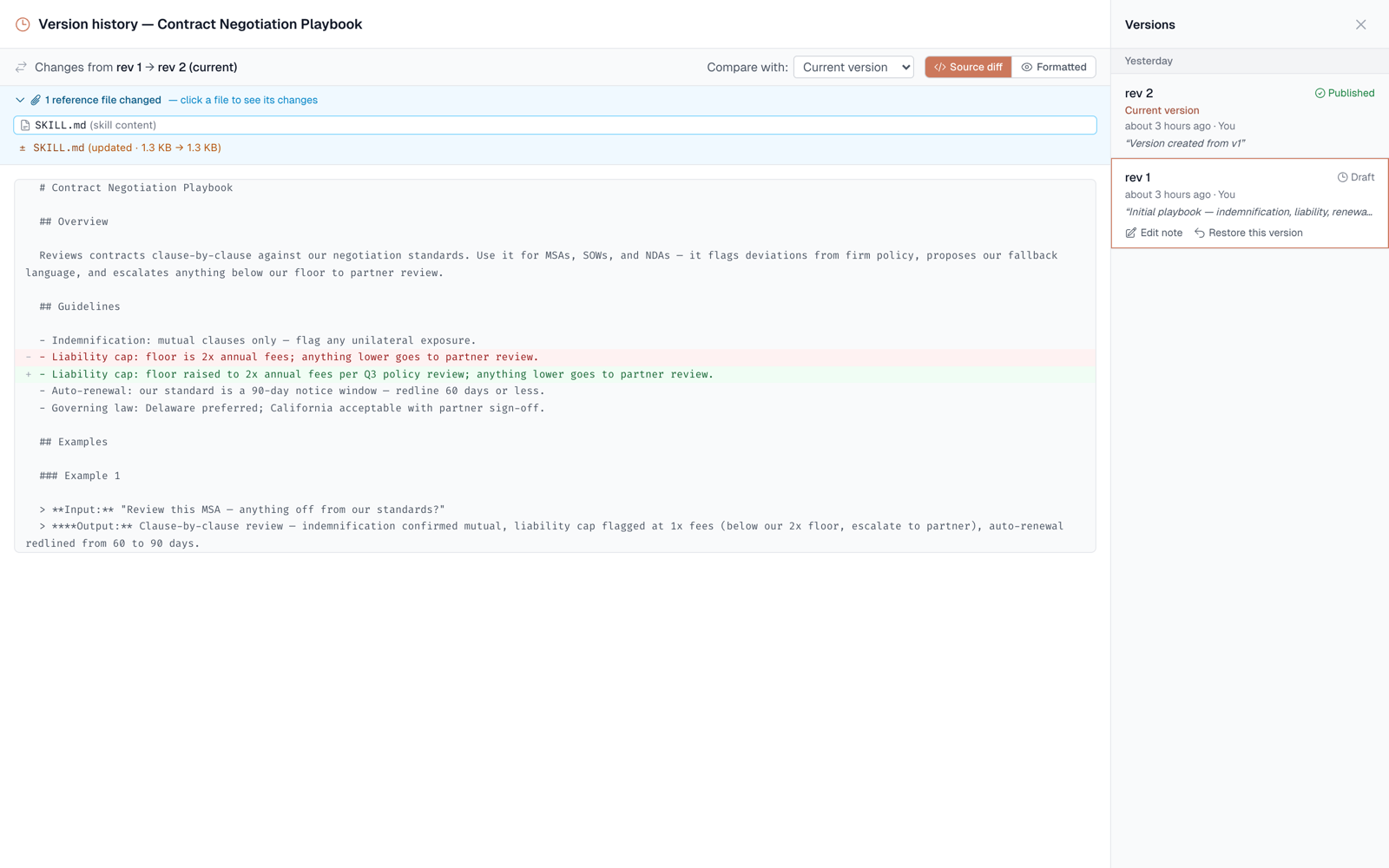
The history rail lists every version, newest first, grouped by day (Today, Yesterday, then dates). Each row shows the version number, its status, the author's real name ("You" for your own edits), the time, and its note. When a version changed attached files, the row says so — "2 reference files updated".
Compare versions
Select any version in the rail to see a highlighted diff:
- By default you're comparing against the current version — "what's different from what runs today".
- Switch to compare against the previous version to see what that single edit changed.
- View the diff formatted (like a document) or as source with +/− lines.
Why teams rely on this
- Trust before use — check what changed in the negotiation playbook before applying it to a live deal.
- Review before publish — diff the draft against the live version so you know exactly what you're shipping to every agent and AI tool.
- Accountability — real author names mean history reads like a record, not a mystery.
Availability
All plans. Anyone with read access or better can view history and compare; use-only recipients cannot (they never see skill contents).