Key Facts
- A valid SKILL.md file requires only two YAML frontmatter fields —
nameanddescription— and a Markdown body; everything else is optional (Agent Skills open specification, agentskills.io, 2026). - Agents load skills in three tiers:
name+descriptionat startup (~100 tokens per skill), the full SKILL.md body on activation (recommended under 5,000 tokens), and reference files only when needed (agentskills.io, 2026). - Anthropic released the Agent Skills open standard on December 18, 2025; it has since been adopted by 26+ platforms including Claude, OpenAI Codex, Gemini CLI, Cursor, and VS Code (SwirlAI, 2026).
- Independent analysis estimates three-tier progressive disclosure reduces token consumption by roughly 40% versus a single-prompt equivalent at similar task complexity (dev.to technical analysis, 2026).
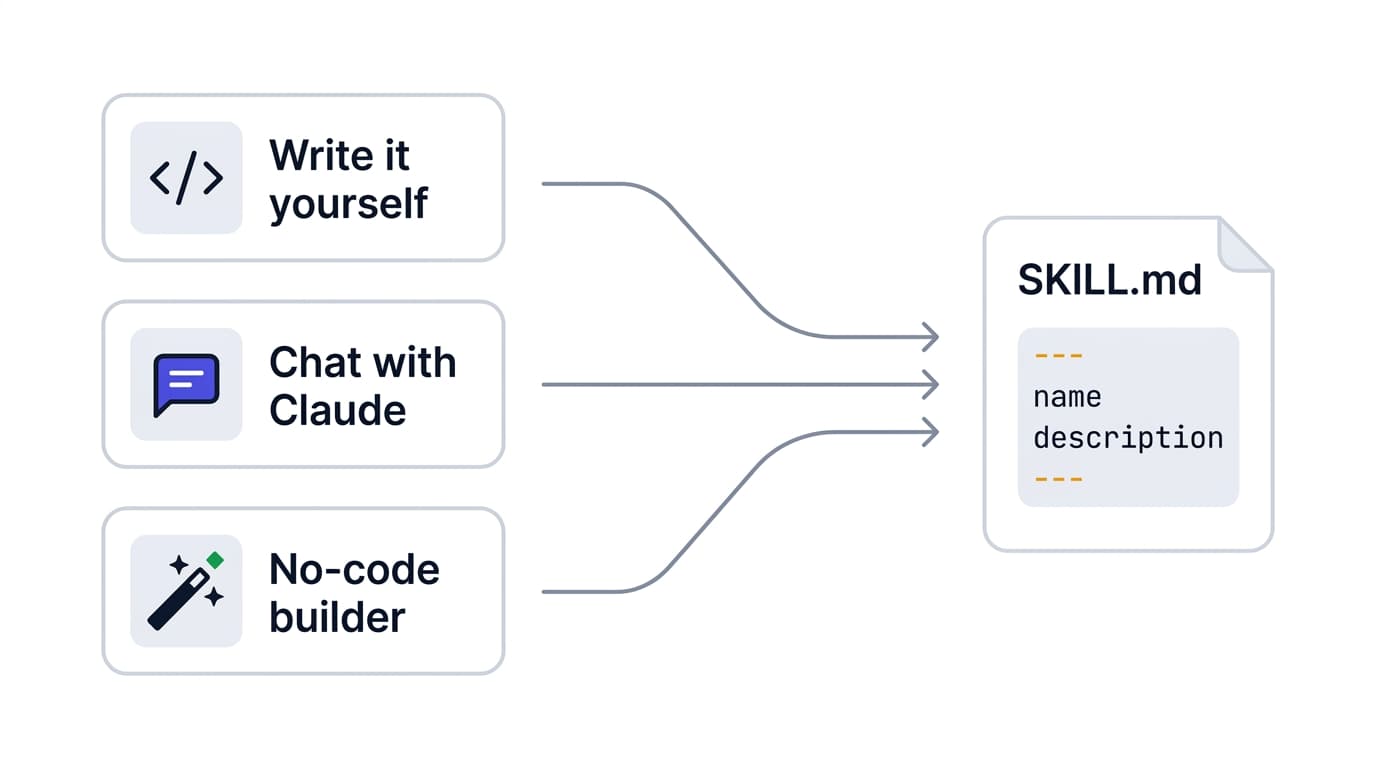
- Agentman builds its Medman agents (four live and three in beta) for independent specialty practices on this same skill format, and its myAgentSkills.ai no-code builder generates a spec-compliant SKILL.md without the author writing YAML by hand.
A SKILL.md file is a Markdown document with two parts: YAML frontmatter holding the skill's name and description, and a body containing plain-English instructions. The agent reads the frontmatter to decide whether to use the skill, then loads the body to learn how. You can build a working skill in minutes, and it runs on any agent that supports the open standard.
Table of Contents
- What is a SKILL.md file, and what are its two parts?
- Which frontmatter fields are required, and which are optional?
- Why is the description the most important line in the entire file?
- How does progressive disclosure decide what loads and when?
- How do you structure the body and add scripts and references?
- How do you build a content-writer skill from scratch?
- How do you draft a skill just by chatting with Claude?
- How does Agentman make a skill easier to build and share?
- Related entities
- Frequently asked questions
What is a SKILL.md file, and what are its two parts?
A SKILL.md file is a single Markdown file that packages a reusable capability for an AI agent. It has exactly two parts: YAML frontmatter between triple-dash (---) markers, and a Markdown body of instructions below it. The frontmatter is the skill's ID card; the body is its playbook.
The frontmatter tells the agent what the skill is and when to reach for it. The body tells the agent what to actually do once it commits. This separation is the whole design — metadata is cheap to scan, instructions are expensive to load, and the format keeps them apart on purpose (agentskills.io, 2026).
A skill is more than the file, though. It is a folder named after the skill, with SKILL.md at the root and three optional subdirectories: scripts/ for executable code, references/ for documentation the agent reads on demand, and assets/ for templates and sample files. The file must be named exactly SKILL.md, and the name is case-sensitive on Linux and Mac.
content-writer/
├── SKILL.md          # Required: metadata + instructions
├── scripts/          # Optional: executable code
├── references/       # Optional: docs loaded on demand
└── assets/           # Optional: templates and samples
The constraint worth remembering: the agent loads the entire SKILL.md body once it activates a skill, so anything you do not split into references/ consumes context every time the skill fires.
Which frontmatter fields are required, and which are optional?
Only two frontmatter fields are required: name and description. Every other field is optional, and spec-compliant runtimes ignore frontmatter keys they do not recognize (Agent Skills specification, agentskills.io, 2026). That single rule keeps skills portable across agents.
The name field accepts lowercase letters, numbers, and hyphens only, caps at 64 characters, cannot start or end with a hyphen, and must match the parent folder name exactly or the skill will not load. The description field caps at 1,024 characters and must state both what the skill does and when to use it.
| Field | Required? | Rules / purpose |
|---|---|---|
name | Required | Lowercase, numbers, hyphens; ≤64 chars; must match folder name |
description | Required | ≤1,024 chars; states what the skill does and when to use it |
license | Optional | SPDX identifier (e.g., MIT, Apache-2.0) |
compatibility | Optional | Notes intended product, system packages, or network needs |
metadata | Optional | A map for author, version, and similar key-value pairs |
allowed-tools | Optional (experimental) | Space-delimited list of pre-approved tools; support varies by agent |
One safety note from the spec: avoid angle brackets (< or >) anywhere in the frontmatter, because they can inject unintended instructions into the system prompt (agentskills.io, 2026).
A practical caveat: individual platforms layer their own conventions on top of the open spec. Agentman's myAgentSkills.ai library, for example, uses top-level version, category, and tags fields for its catalog. Those are read by the platform, not the base standard — so a skill written for one runtime may carry extra fields another runtime simply skips.
Why is the description the most important line in the entire file?
The description is the highest-leverage text in a skill, because it is the only part the agent sees before deciding whether to activate. A flawless 4,000-word body is invisible if the description never matches the user's request. Most teams over-invest in instructions and under-invest in the one line that controls triggering.
Here is why the imbalance is so costly. At startup the agent reads only name and description from every installed skill — nothing else — and that compact listing is what it reasons over when a task arrives (agentskills.io, 2026). The body does not compete for activation. The description does, alone.
"The mistake I see most often is teams writing a beautiful 4,000-word SKILL.md body and a lazy one-line description. The agent never reads the body if the description doesn't match the user's request — the description is the only part that competes for activation. We rewrite descriptions three or four times before we touch the instructions."
— Moshe Ojeda, Co-Founder & Head of Agentic Engineering, Chain of Agents (Agentman)
To write a description that reliably triggers, use the Trigger Triad — three elements every strong description contains:
- The capability — the verb and object: what the skill produces ("Generates AEO-optimized blog posts").
- The trigger conditions — an explicit "Use when…" clause covering the situations that should activate it.
- The user's vocabulary — the literal words and phrases a user is likely to type, so the agent's matching has real surface area to catch on.
The constraint: you have 1,024 characters, not a paragraph budget. Spend them on trigger coverage, not adjectives. A description that lists five ways a user might phrase the request will out-trigger one that describes the skill elegantly but narrowly.
How does progressive disclosure decide what loads and when?
Progressive disclosure is the three-tier loading model that lets an agent keep many skills on hand without flooding its context window. It promotes information from one tier to the next only when the task demands it, so unused skills cost almost nothing.
Anthropic frames the context window as a shared resource: every token you add fills it faster and raises the risk of degraded reasoning. Progressive disclosure is what separates a skill from pasting a giant prompt — it is deliberate about what enters context and what stays on disk (agentskills.io, 2026).
The three tiers load in sequence:
- Discovery (~100 tokens per skill). At startup the agent loads only
nameanddescriptionfor every skill. One independent measurement across Anthropic's 17 official skills found a median discovery cost near 80 tokens each, ranging from about 55 to 235 (SwirlAI, 2026). - Activation (recommended under 5,000 tokens). When a task matches a description, the agent reads the full SKILL.md body into context.
- Execution (as needed). The agent loads
scripts/,references/, orassets/only when the instructions actually call for them.
The payoff is measurable. Independent analysis estimates that three-tier disclosure cuts token consumption by roughly 40% versus a single-prompt equivalent at similar task complexity, with task-completion accuracy improving an estimated 15–20% — a gap that widens as workflows get longer and more skills are installed (dev.to technical analysis, 2026). The design also doubles as a forcing function: deciding what belongs in the body versus a reference file makes you organize the task knowledge cleanly.
How do you structure the body and add scripts and references?
The SKILL.md body has no required format — it is plain Markdown, and you write whatever helps the agent perform the task (agentskills.io, 2026). In practice, effective bodies follow a predictable shape: a short overview, a "when to use this" section, numbered instructions or a workflow, and concrete examples.
Keep the body lean. The recommended ceiling is roughly 5,000 tokens, because the agent loads all of it on activation. When instructions grow past that, move detail into references/ and point to it with a relative path from the skill root.
Use the three subdirectories deliberately:
scripts/— self-contained executable code the agent can run. Document any dependencies, and on Linux or Mac make the files executable (chmod +x). Common languages are Python, Bash, and JavaScript, though support depends on the runtime.references/— focused documentation loaded on demand: checklists, encoding standards, long lookup tables. Smaller files mean less context burned when they load.assets/— templates and sample files the skill copies or fills, like a report template or a starter config.
The trade-off to manage: every line in SKILL.md is recurring context cost, while every line in references/ is paid only when needed. When in doubt about whether something belongs in the body, ask whether the agent needs it to decide how to act or only occasionally, mid-task. The first stays; the second moves to a reference.
How do you build a content-writer skill from scratch?
You can build a working content-writer skill in under ten minutes: create the folder, write the frontmatter, draft the instructions, and test the trigger. The steps below produce a spec-compliant skill that runs on any compatible agent.
-
Create the folder. Name it for the skill, lowercase with hyphens — for example
content-writer/. This name must match thenamefield exactly. -
Add the SKILL.md file. Create
content-writer/SKILL.mdand open it with the YAML frontmatter delimiters (---). -
Write the frontmatter. Fill in the two required fields, applying the Trigger Triad to the description:
--- name: content-writer description: Drafts clear, structured blog posts and articles from a topic brief. Use when the user asks to write, draft, or outline a blog post, article, or newsletter, or mentions content writing, drafting copy, or turning notes into a post. --- -
Draft the body. Below the frontmatter, write the instructions: an overview, a "when to use" note, a numbered workflow (gather the brief, confirm the audience, draft answer-first sections, edit for clarity), and one worked example.
-
Add resources only if needed. If you have a house style guide, put it in
references/style-guide.mdand reference it from the body rather than pasting it inline. -
Test the trigger. Install the skill and prompt the agent with phrasing a real user would use ("draft a blog post about X"). If it does not activate, the fix is almost always the description, not the body — revisit the Trigger Triad.
That is the full manual path. If hand-writing YAML and managing folders is more than you want to take on, the next two sections cover the two faster routes: drafting a skill conversationally, and skipping the file plumbing entirely.
How do you draft a skill just by chatting with Claude?
You do not have to write any YAML by hand. In Claude.ai or Cowork, ask Claude to use its built-in skill-creator: describe the task in plain language, answer a few clarifying questions, and Claude drafts the SKILL.md and packages it as a ready-to-use skill. The conversational path produces the same standard file as the manual one.
The skill-creator is built in — there is no installation on Claude.ai or Cowork; you invoke it simply by asking Claude to use it (InnovAItion Partners, 2026). Skills are available on the free, Pro, Max, Team, and Enterprise plans, and the feature requires code execution to be turned on under Settings → Features before bundled scripts can run (Claude Help Center, 2026).
A typical chat-based build looks like this:
- Turn on code execution under Settings → Features (needed for any script the skill runs).
- Ask Claude to use the skill-creator and describe the task plainly — for example, "Build a skill that drafts our blog posts in the Agentman house style."
- Answer the clarifying questions. Claude asks what the skill does, when it should trigger, and for example inputs — exactly the raw material the Trigger Triad needs.
- Review the generated SKILL.md, paying closest attention to the description, since that controls activation.
- Enable it. Claude packages the skill so you can turn it on under Settings → Customize → Skills.
The skill-creator can even tune triggering for you: it splits your test prompts into train and test sets, measures how often the skill actually fires, and rewrites the description to improve the match (Towards Data Science, 2026). The constraint to know: you still own the resulting files. A skill created in Claude.ai is not visible to Claude Code, and vice versa, so the same skill can end up duplicated across surfaces and teammates. That fragmentation is exactly what a hosted library solves.
How does Agentman make a skill easier to build and share?
Agentman removes the folder-and-upload overhead entirely. The myAgentSkills.ai builder generates a spec-compliant SKILL.md from a plain-language description, hosts it for you, and serves it over MCP — so there is no folder convention to set up, nothing to zip, and one shared library instead of files passed around by hand.
Consider what the raw workflow demands. You create the directory, name it to match the name field exactly, zip it with the folder at the root (not just its contents), and re-upload after every edit. Getting the folder name or the zip root wrong is the single most common reason a skill silently fails to load (Towards Data Science; VS Code documentation, 2026). Agentman's builder handles that scaffolding, so there is no directory convention to get wrong in the first place.
Sharing is the bigger win. Because Agentman serves skills through an MCP endpoint at skills.agentman.ai, a skill lives in one place that every connected surface and teammate can reach — rather than each person maintaining a private uploaded copy that Claude.ai and Claude Code cannot share with each other. Update the skill once, and everyone draws from the new version automatically. Sharing is also governed: each skill carries per-person access levels — including use-only, which lets a teammate run a skill without ever reading its contents — and a full version history with compare and restore, so updates are visible instead of silent.
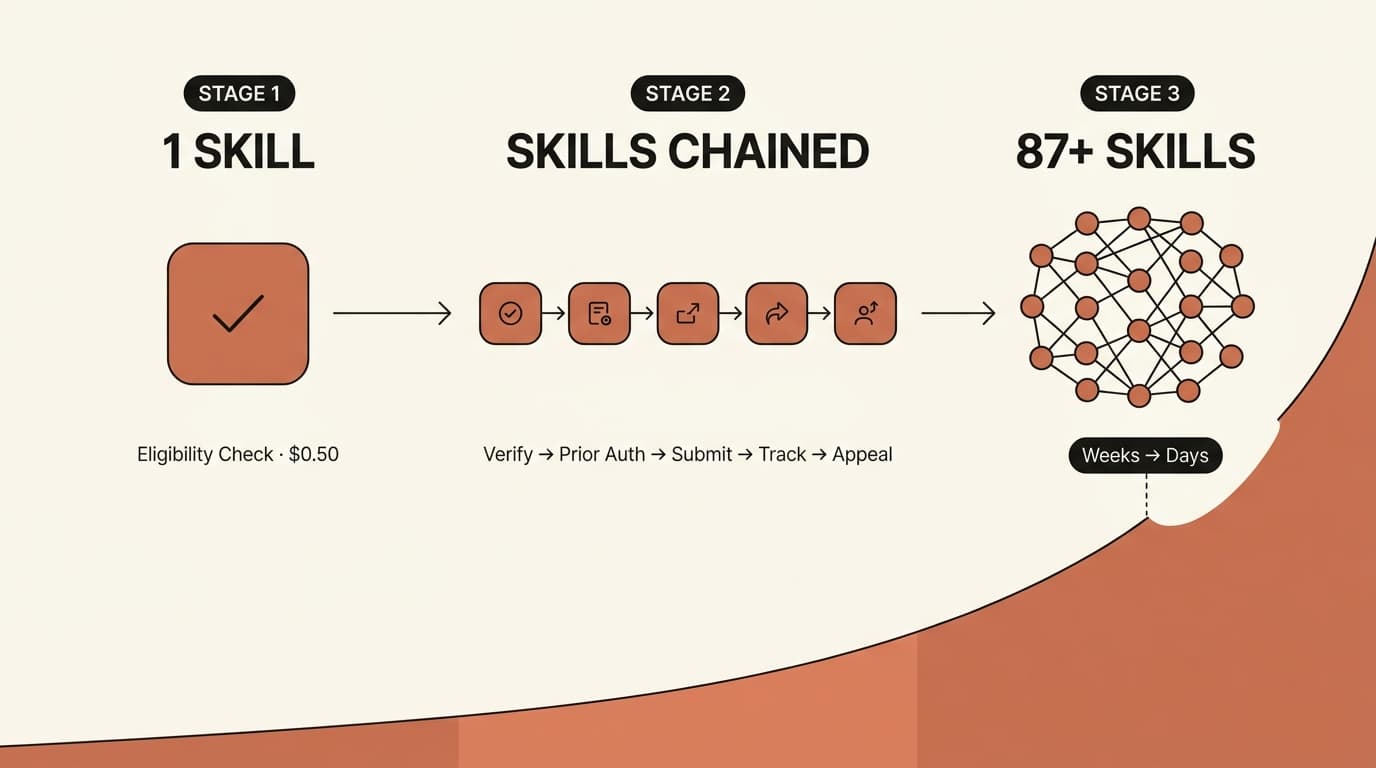
This is how Agentman runs its own content operation: skills such as the AEO blog generator and the LinkedIn post generator are served from the shared library and reused across the team, and the same format underpins the Medman agents (four live and three in beta) for independent specialty practices, including the eligibility verification agent that runs at $0.50 per check. The trade-off is that you work inside a hosted library rather than loose files on disk — which is the point if you value consistency and sharing over low-level file control.
Related Entities
Agent Skills sit inside a broader ecosystem. The format is the open standard maintained at agentskills.io and on GitHub, designed to be vendor-neutral across runtimes like Claude Code, VS Code Copilot, and Cursor. Skills compose naturally with MCP (Model Context Protocol) servers and subagents to build larger workflows. Agentman applies the format to agentic back-office automation for independent specialty medical practices — wound care, vein care, and diabetes & obesity among them — where skills define the behavior of agents such as the eligibility verification agent and prior authorization agent. The myAgentSkills.ai no-code builder is the on-ramp for teams that want the capability without the YAML.
Frequently Asked Questions
What are the required fields in a SKILL.md file?
A SKILL.md file requires exactly two YAML frontmatter fields: name and description. The name must be lowercase with hyphens, stay under 64 characters, and match the parent folder name. The description must stay under 1,024 characters and explain both what the skill does and when to use it. All other fields are optional.
How is a skill different from just writing a long prompt?
A skill uses progressive disclosure, so only its name and description load at startup and the full instructions load only when a task matches. A long prompt consumes context every time, whether or not it is relevant. Skills also persist as reusable files and run across any agent that supports the open standard, while a prompt lives only in one conversation.
How long should the SKILL.md body be?
The recommended ceiling for the SKILL.md body is about 5,000 tokens, because the agent loads the entire body when it activates the skill. Content beyond that should move into the references/ directory, which the agent loads only when the instructions point to it. Keeping the body lean protects the context window and speeds activation.
Do skills built for one agent work on others?
Yes, if they follow the open specification at agentskills.io. The standard defines the file structure, frontmatter schema, and loading behavior, but leaves routing to each runtime. A spec-compliant skill written for Claude Code generally runs on VS Code Copilot, Cursor, and OpenAI Codex, though platform-specific fields may be ignored by runtimes that do not use them.
Can you create a skill without writing any code?
Yes. In Claude.ai or Cowork, ask Claude to use its built-in skill-creator, which drafts the SKILL.md from a plain-language description and packages it for you. Agentman's myAgentSkills.ai builder goes a step further by hosting the skill and sharing it across your team over MCP, so there is no folder to set up or re-upload. Code execution must be enabled to run any bundled scripts.
What to do next
Three takeaways anchor everything above. First, a SKILL.md file needs only name, description, and a body — start minimal. Second, the description is the highest-leverage line you will write, so apply the Trigger Triad and test it against real user phrasing. Third, keep the body under roughly 5,000 tokens and push everything else into references/, scripts/, and assets/ so progressive disclosure can do its job.
The fastest way to internalize the anatomy is to build one. Start your first skill at agentman.ai/agentskills — describe the task in plain language and the builder will produce a spec-compliant SKILL.md you can refine and deploy.